Författare: Erik
Erik har jobbat med webb professionellt sedan 2008. Från 2005 till 2008 studerades webb på ING/JTH och dessförinnan skapades webb på all fritid. Första sajten byggdes någon gång mellan 1996-1998.
Rensa bort specialtecken ur filnamn vid uppladdning
<?php
/*
Plugin Name: Extended sanitize filename
Plugin URI:
Description: Replace and/or remove accents and other special characters in filenames on upload
Version: 1
Author: Hippies
Author URI: http://hippies.se
*/
add_filter( 'sanitize_file_name', 'extended_sanitize_file_name', 10, 2 );
function extended_sanitize_file_name( $filename ) {
	$sanitized_filename = remove_accents( $filename );
	return $sanitized_filename;
}
ipm-video-tuts-plugin
<?php
/*
Plugin Name: IPM Video Tuts
Plugin URI: http://ipmulricehamn.se
Description: Show youtube tutorial videos on dashboard.
Version: 1.0
Author: Michael & Erik
Author URI: http://ipmulricehamn.se
*/

/* Enqueue js file */
function enqueue_vt_js($hook) {
    if( 'index.php' != $hook )
        return;
    wp_enqueue_script( 'video_script', plugins_url('/ipm-video-tuts.js', __FILE__) );
    wp_register_style( 'video_wp_admin_css', plugins_url('/ipm-video-tuts.css', __FILE__), false, '1.0.0' );
    wp_enqueue_style( 'video_wp_admin_css' );
}
add_action( 'admin_enqueue_scripts', 'enqueue_vt_js' );


// Create the function to output the contents of our Dashboard Widget
function videos_dashboard_widget_function() {
	// Display our videos

	/*
		Example embed code from youtube
		rel=0 == inga föreslagna videoklipp visas när klippet är slut

		<iframe width="640" height="360" src="http://www.youtube.com/embed/069Xr8IuGxY?rel=0" frameborder="0" allowfullscreen></iframe>


	*/


	?>
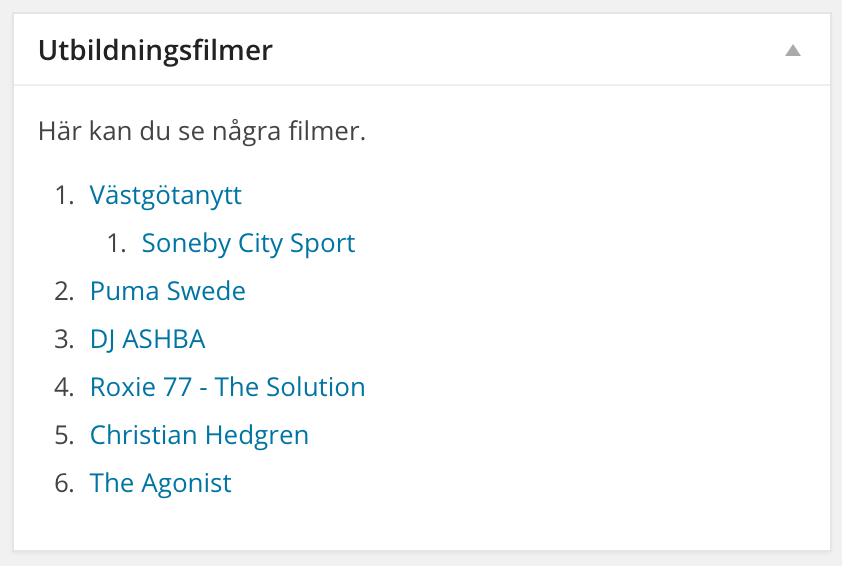
	<p>Här kan du se några filmer.</p>
	<ol class="video-tuts">
		<li><a href="https://www.youtube.com/watch?v=e1Ukb4LStUU" data-embed="e1Ukb4LStUU">Västgötanytt</a></li>
			<ol>
				<li><a href="https://www.youtube.com/watch?v=aqpnGBO19FY" data-embed="aqpnGBO19FY">Soneby City Sport</a></li>
			</ol>
		<li><a href="https://www.youtube.com/watch?v=_XZorHsav1E" data-embed="_XZorHsav1E">Puma Swede</a></li>
		<li><a href="https://www.youtube.com/watch?v=ifhy57GpNLc" data-embed="ifhy57GpNLc">DJ ASHBA</a></li>
		<li><a href="https://www.youtube.com/watch?v=wlYvspZ3ZhE" data-embed="wlYvspZ3ZhE">Roxie 77 - The Solution</a></li>
		<li><a href="https://www.youtube.com/watch?v=FO5jo0imeSQ" data-embed="FO5jo0imeSQ">Christian Hedgren</a></li>
		<li><a href="https://www.youtube.com/watch?v=_jud_SnKTlY" data-embed="_jud_SnKTlY">The Agonist</a></li>
	</ol>
	<?php
}

// Create the function use in the action hook

function videos_add_dashboard_widgets() {
	wp_add_dashboard_widget('videos_dashboard_widget', __('Utbildningsfilmer', 'video-tuts'), 'videos_dashboard_widget_function');
}

// Hook into the 'wp_dashboard_setup' action to register our other functions

add_action('wp_dashboard_setup', 'videos_add_dashboard_widgets' );
jQuery(document).ready(function($) {

   $("ol.video-tuts li a").click(function(e){

   		e.preventDefault();

   		var obj = $(this);
   		var parent = obj.parent();
   		var list = parent.parents('ol');
   		var vidID = obj.data('embed');

   		list.find('.embed-container').remove();

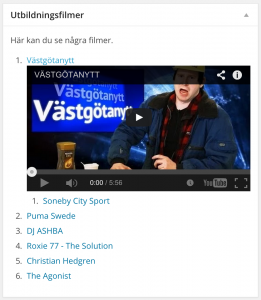
   		parent.append($('<div class="embed-container"><iframe class="ipm-video-frame" width="680" height="480" src="https://www.youtube.com/embed/'+ vidID +'?rel=0" frameborder="0" allowfullscreen></iframe></div>'));
   });

 });
ol.video-tuts  {

}
.ipm-video-frame {
	clear: both;
	display: block;
}
.embed-container { position: relative; padding-bottom: 56.25%; height: 0; overflow: hidden; max-width: 100%; height: auto; }
.embed-container iframe, .embed-container object, .embed-container embed { position: absolute; top: 0; left: 0; width: 100%; height: 100%; }
Khromovs limit-author-view-scope
<?php
/*
Plugin Name: Limit Author View scope
Plugin URI:
Description: Limits non-admins to only see their own media and comments.
Version: 2014.05.28
Author: khromov
Author URI: https://profiles.wordpress.org/khromov
License: GPL2
*/

/** ---- Media ---- **/

/**
 * Filters media
 */
add_action('pre_get_posts', function($wp_query)
{
	global $current_user;

	if(!current_user_can('manage_options') && (is_admin() && $wp_query->query['post_type'] === 'attachment'))
		$wp_query->set('author', $current_user->ID);
}, 11);

/**
 * Fix unattached count
 */
add_filter('wp_count_unattached_attachments', function($attachments)
{
	global $wpdb;
	global $current_user;

	return $wpdb->get_var( "SELECT COUNT( * ) FROM $wpdb->posts WHERE post_type = 'attachment' AND post_status != 'trash' AND post_parent < 1 AND post_author = {$current_user->ID}" );
});

/*
 * Fix regular counts
 */
add_filter('wp_count_attachments', function($counts_in)
{
	global $wpdb;
	global $current_user;

	$and = wp_post_mime_type_where(''); //Default mime type //AND post_author = {$current_user->ID}
	$count = $wpdb->get_results( "SELECT post_mime_type, COUNT( * ) AS num_posts FROM $wpdb->posts WHERE post_type = 'attachment' AND post_status != 'trash' AND post_author = {$current_user->ID} $and GROUP BY post_mime_type", ARRAY_A );

	$counts = array();
	foreach((array)$count as $row)
		$counts[ $row['post_mime_type'] ] = $row['num_posts'];

	$counts['trash'] = $wpdb->get_var( "SELECT COUNT( * ) FROM $wpdb->posts WHERE post_type = 'attachment' AND post_author = {$current_user->ID} AND post_status = 'trash' $and");
	return $counts;
});
Modda rollnamn
function wps_change_role_name() {
    global $wp_roles;
    if ( ! isset( $wp_roles ) )
        $wp_roles = new WP_Roles();
    $wp_roles->roles['contributor']['name'] = 'Owner';
    $wp_roles->role_names['contributor'] = 'Owner';
}
add_action('init', 'wps_change_role_name');
User role editor
Bra plugin för att sätta egna capabilities etc
WP stats
<?php
	$stat = sprintf(  '%d queries in %.3f seconds, using %.2fMB memory',
	get_num_queries(),
	timer_stop( 0, 3 ),
	memory_get_peak_usage() / 1024 / 1024
	);
	echo $stat;
?>
Sifferpaginering i WP
Sifferpaginering i WP. In med detta.
functions.php
if ( ! function_exists( 'paging_nav_num' ) ) :
	/**
	 * Displays navigation to next/previous set of posts with numbers.
	 *
	 */
	function paging_nav_num () {
	    global $wp_query;
	    $big = 999999999; // need an unlikely integer
	    $pages = paginate_links( array(
	        'base' => str_replace( $big, '%#%', esc_url( get_pagenum_link( $big ) ) ),
	        'format' => '?paged=%#%',
	        'current' => max( 1, get_query_var('paged') ),
	        'total' => $wp_query->max_num_pages,
	        'prev_next' => false,
	        'type'  => 'array'
	    ) );
	    if( is_array( $pages ) ) {
	        $paged = ( get_query_var('paged') == 0 ) ? 1 : get_query_var('paged');
	        echo '<div class="pagination"><ul class="page-numbers">';
	        //echo '<li><span>'. $paged . ' av ' . $wp_query->max_num_pages .'</span></li>';
	        foreach ( $pages as $page ) {
	                echo "<li>$page</li>";
	        }
	       echo '</ul></div>';
	    }
	}
endif;
index.php
// Previous/next post navigation.
paging_nav_num();
CSS
/* Pagination */
.pagination {
	margin: 1em 0 3em;
	text-align: center;
}
.pagination ul.page-numbers {
	list-style: none;
	padding: 0;
}
.pagination ul.page-numbers li {
	display: inline-block;
}
.pagination ul.page-numbers li a, .pagination ul.page-numbers li .current {
	padding: .5em;
}
.pagination ul.page-numbers li a {
	text-decoration: none;
}
.pagination ul.page-numbers li .current {
	border-bottom: 1px solid #333;
}
Behåll kategoristruktur i admin
Vill man behålla kategoristrukturen även efter man har checkat ett par kategorier och sparat så kan man köra följande funktion.
Här kollar vi även efter en taxonomi döpt till ”books” för att enbart targeta denna.
add_filter( 'wp_terms_checklist_args', 'my_website_wp_terms_checklist_args', 1, 2 );
function my_website_wp_terms_checklist_args( $args, $post_id ) {

   // If the taxonomy is set and equals 'books'
   if ( isset( $args['taxonomy'] ) && 'books' == $args['taxonomy'] )
       $args[ 'checked_ontop' ] = false;

   return $args;

}
Fixa så höjden stämmer på ett < svg >-objekt (cross-browser)
IE11 är en av flera browsers som inte fixar att kirra höjd på ett svg-objekt ordentligt. Följande metod kan funka som ett fulhack för att få det att fungera. Se till att ha med viewBox i din svg.
- Räkna ratio på viewboxen (höjd/bredd) – exempelvis blir ett värde på 0,1234 = 12,34%
- Omslut med en div (ex. class=”svg-wrapper”)
I CSSen sätter du:
.svg-wrapper {
   padding-bottom: [din ratio]% //(se procentvärdet ovan)
   position: relative;
}

.svg-wrapper svg {
    height: 100%;
    left: 0;
    position: absolute;
    top: 0;
    width: auto; //(alltså 100%)
}
Fixa responsivt oembed i WP
WP är gött när du ska publicera en video eller annat gött. Bara att klistra in länken i editorn och vips är det embeddat och klart. Däremot har det vart dåligt med responsiviteten i detta. Så ett sätt att lösa det på är följande:
1. Vi jobbar med embed-CSS från http://embedresponsively.com/
.embed-container { position: relative; padding-bottom: 56.25%; padding-top: 30px; height: 0; overflow: hidden; max-width: 100%; height: auto; }
.embed-container iframe, .embed-container object, .embed-container embed { position: absolute; top: 0; left: 0; width: 100%; height: 100%; }
2. Därefter slänger vi in en liten funktion i vår functions.php
function responsive_video_wrapping($html, $url, $attr) {
	$html = '<div class="embed-container">' . $html . '</div>';
	return $html;
}
add_filter( 'embed_oembed_html', 'responsive_video_wrapping', 10, 3);
Ta bort feed från WP-installation
Används med fördel med tidigare nämnda ”remove bös from wp_head”.
// Disable the /feed-urls
function disable_feed() {
	wp_die( __('Inget tillgängligt feed, gå till <a href="'. get_bloginfo('url') .'">drommenomboras.se</a>!', 'dob') );
}

add_action('do_feed', 'disable_feed', 1);
add_action('do_feed_rdf', 'disable_feed', 1);
add_action('do_feed_rss', 'disable_feed', 1);
add_action('do_feed_rss2', 'disable_feed', 1);
add_action('do_feed_atom', 'disable_feed', 1);
Döp om ”Posts” i WP-admin
function change_post_menu_label() {
    global $menu;
    global $submenu;
    $menu[5][0] = 'Contacts';
    $submenu['edit.php'][5][0] = 'Contacts';
    $submenu['edit.php'][10][0] = 'Add Contacts';
    $submenu['edit.php'][15][0] = 'Status'; // Change name for categories
    $submenu['edit.php'][16][0] = 'Labels'; // Change name for tags
    echo '';
}

function change_post_object_label() {
        global $wp_post_types;
        $labels = &$wp_post_types['post']->labels;
        $labels->name = 'Contacts';
        $labels->singular_name = 'Contact';
        $labels->add_new = 'Add Contact';
        $labels->add_new_item = 'Add Contact';
        $labels->edit_item = 'Edit Contacts';
        $labels->new_item = 'Contact';
        $labels->view_item = 'View Contact';
        $labels->search_items = 'Search Contacts';
        $labels->not_found = 'No Contacts found';
        $labels->not_found_in_trash = 'No Contacts found in Trash';
    }
    add_action( 'init', 'change_post_object_label' );
    add_action( 'admin_menu', 'change_post_menu_label' );
Notis: behöver justeras så de nya namnen inte slår igenom på lägre user roles (subscriber). Upptäckte detta häromdan, menyrubriken blir synlig men går inte att komma åt via klick. Dock osmidigt om man jobbar med lägre roller.
Kolla om sträng innehåller http/https
$url = 'http://www.sweet.yeah';
$urlcheck = preg_match('/https?\:\/\//', $url);

if ( $urlcheck > 0 ) {
//echo stuff
}
Är det en subpage?
global $post;     // if outside the loop

if ( is_page() && $post->post_parent ) {
    // This is a subpage

} else {
    // This is not a subpage
}
Eller
functions.php
function is_tree($pid) {      // $pid = The ID of the page we're looking for pages underneath
    global $post;         // load details about this page
    $anc = get_post_ancestors( $post->ID );
    foreach($anc as $ancestor) {
        if(is_page() && $ancestor == $pid) {
            return true;
        }
    }
    if(is_page() && (is_page($pid)))
               return true;   // we're at the page or at a sub page
    else
               return false;  // we're elsewhere
};
if(is_tree('2')){ // 2 being the parent page id
   // Do something if the parent page of the current page has the id of two
}
Schyssta kartor genom moddade Google Maps
Först behöver du hämta en API-nyckel (Browser key ska du ha). Det görs här: https://developers.google.com/maps/documentation/javascript/tutorial#api_key (direktlänk).
Skicka in den i följande:
<script type="text/javascript" src="https://maps.googleapis.com/maps/api/js?key=[YOUR_API_KEY]&sensor=false"></script>
Sen skapar du kartan. Här även med en egen marker. Magin händer i styles-arrayen. Förgjorda sköna styles kan man hämta/modda på t.ex. http://snazzymaps.com/
JS
// Generate custom map
if ($('#map').size() > 0)
	$('body').googleMaps();
(function($) {

	$.fn.googleMaps = function() {

		init();

		function init() {

				var lat = '[your-lat]',
					lng = '[your-lng]';

				var myLatlng = new google.maps.LatLng(lat,lng);
				var image = 'http://[dindomän.se]/assets/images/map-marker.png';

                var mapOptions = {
                    // Zoom (always required)
                    zoom: 9,

                    // The latitude and longitude to center the map (always required)
                    center: new google.maps.LatLng(lat, lng),
								mapTypeId: google.maps.MapTypeId.ROADMAP,
                    // Map styling
                    styles: [{featureType:"landscape",stylers:[{saturation:-100},{lightness:65},{visibility:"on"}]},{featureType:"poi",stylers:[{saturation:-100},{lightness:51},{visibility:"simplified"}]},{featureType:"road.highway",stylers:[{saturation:-100},{visibility:"simplified"}]},{featureType:"road.arterial",stylers:[{saturation:-100},{lightness:30},{visibility:"on"}]},{featureType:"road.local",stylers:[{saturation:-100},{lightness:40},{visibility:"on"}]},{featureType:"transit",stylers:[{saturation:-100},{visibility:"simplified"}]},{featureType:"administrative.province",stylers:[{visibility:"off"}]/**/},{featureType:"administrative.locality",stylers:[{visibility:"on"}]},{featureType:"administrative.neighborhood",stylers:[{visibility:"on"}]/**/},{featureType:"water",elementType:"labels",stylers:[{visibility:"on"},{lightness:-25},{saturation:-100}]},{featureType:"water",elementType:"geometry",stylers:[{hue:"#7b868c"},{lightness:-25},{saturation:-97}]}]
                };

                // Get the HTML DOM element that will contain your map
                // We are using a div with id="map"
                var mapElement = document.getElementById('map');

                // Create the Google Map using out element and options defined above
                var map = new google.maps.Map(mapElement, mapOptions);

                // Place marker on map
        		var marker = new google.maps.Marker({
			    	position: myLatlng,
			    	animation: google.maps.Animation.b,
			    	map: map,
			    	icon: image
				});

		}

	}

})(jQuery);
HTML
<div id="map"></div>
CSS
#map {
	height: 300px; /* Höjd på kartan */
	width: 100%;
}
Fixa zoom-kontrollsbugg
Ofta kör man en
img {
max-width: 100%;
}
Detta breakar dock kontrollerna som läggs på av Google på kartan. För att fixa detta kör:
.gmnoprint img {
    max-width: none;
}
eller
#map_canvas img{
max-width: none
}
Rensa upp i TinyMCE i WP
/*
 * Modifying TinyMCE editor to remove unused items.
 */
function customformatTinyMCE($init) {
	// Add block format elements you want to show in dropdown
	$init['theme_advanced_blockformats'] = 'p,pre,h1,h2,h3,h4';
	$init['theme_advanced_disable'] = 'strikethrough,underline,forecolor,justifyfull';

	return $init;
}

// Modify Tiny_MCE init
add_filter('tiny_mce_before_init', 'customformatTinyMCE' );
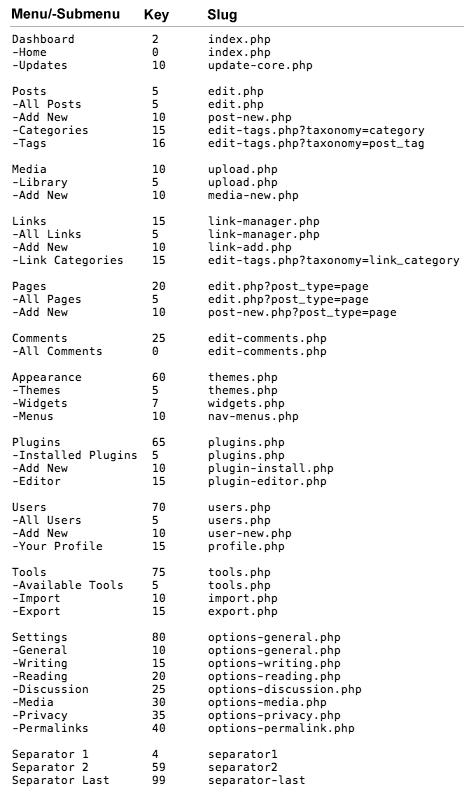
Rensa länkar i WP admin
// ----------------------------------
// --  REMOVE LEFT NAV MENU ITEMS  --
// ----------------------------------

function pc_remove_links_menu() {

     global $menu;

     remove_menu_page('upload.php'); // Media
     remove_menu_page('link-manager.php'); // Links
     remove_menu_page('edit-comments.php'); // Comments
     remove_menu_page('plugins.php'); // Plugins
     remove_menu_page('options-general.php'); // Settings
     remove_menu_page('tools.php'); // Tools
}

add_action( 'admin_menu', 'pc_remove_links_menu' );

// ----------------------------
// --  REMOVE NAV SUB MENUS  --
// ----------------------------

function pc_remove_submenus() {

  global $submenu;

  unset($submenu['index.php'][10]); // Removes 'Updates'.
  unset($submenu['themes.php'][5]); // Removes 'Themes'.
  unset($submenu['options-general.php'][15]); // Removes 'Writing'.
  unset($submenu['options-general.php'][25]); // Removes 'Discussion'.
  unset($submenu['edit.php'][16]); // Removes 'Tags'.
  unset($submenu['edit.php'][15]); // Remove 'Categories'.
  unset($submenu['tools.php'][5]); // Removes 'Available Tools'.
  unset($submenu['tools.php'][10]); // Removes 'Import'.
  unset($submenu['tools.php'][15]); // Removes 'Export'.
  unset($submenu['tools.php'][25]); // Removes 'Delete Site'.
  unset($submenu['users.php'][10]); // Removes 'Add new user'.
  unset($submenu['users.php'][5]); // Removes 'All Users'.
}

add_action( 'admin_menu', 'pc_remove_submenus' );
http://code.tutsplus.com/tutorials/customizing-your-wordpress-admin–wp-24941
Redirect innan cache slår in
Ibland behöver man kör en redirect innan t.ex. WP SuperCache eller Total Cache kickar in.
Lägg till liknande i wp-config.php
if ($_SERVER['REQUEST_URI'] == '/' && !isset($_GET['start'])) {
	header("Location: /din-sida/");
	exit;
}
Ovanstående exempel kollar även av om en startparameter är inskickad, då ska den inte redirecta. Liknande kan vara bra om man vill kunna länka mot originalsidan utan att få redirect.
Visa dolda filer i OS X
Jag vet, busenkelt. Men lyckas alltid glömma av skiten till varje gång jag behöver leta fram en gammal .htaccess-fil osv. Här kommer lathunden. In i terminalen och skriv:
defaults write com.apple.finder AppleShowAllFiles TRUE
killall Finder
För att återgå:
defaults write com.apple.finder AppleShowAllFiles FALSE
killall Finder